Whether the AI system you shipped last quarter will still be running next year without being rebuilt from scratch.
When people write about sustainability and AI, they usually mean electricity. Datacentre load, water consumption, the emissions cost of a training run.
That’s a real conversation. It isn’t this one.
I want to talk about a different kind of sustainability: whether the AI system your team shipped last quarter will still be running next year without being rebuilt from scratch.
Because most of them won’t be.
Software decays. AI systems expire.
Traditional software ages gracefully. Dependencies drift, documentation goes stale, the odd library hits end-of-life — but the thing keeps running. Decay is slow, visible and negotiable.
AI systems don’t work like that. They fail discontinuously.
A model gets deprecated and your application stops working on a date set by someone else’s roadmap. A provider updates a checkpoint and your carefully tuned prompt quietly starts producing different output — not worse in any way that throws an error, just different enough to matter.
And occasionally the model simply disappears. In June, three days after Anthropic released Claude Fable 5, a US export control directive forced it offline for every customer worldwide. It came back on 1 July once the controls were lifted. Nineteen days is survivable. The point is that nobody in the dependency chain chose it — not the customers, not the vendor — and almost no architecture review had that failure mode on the list.
The uncomfortable truth is that most AI systems being built right now are built against a specific model, a specific prompt and a specific moment. They aren’t built to last. They’re built to demo.
Sustainable AI engineering is the discipline of building systems that survive the thing underneath them changing.
Here’s what that actually requires.
1. Your foundation has an expiry date
Cloud infrastructure gave us a decade of stability. An EC2 instance you provisioned in 2016 behaves the same way today. That stability quietly shaped how we build.
Foundation models offer nothing of the sort. The useful life of a frontier model is somewhere between six and eighteen months, and the decision to retire it isn’t yours.
This means model substitution has to be a design assumption, not a migration project. If swapping the model behind a feature requires a sprint of prompt rewriting and manual spot-checking, you don’t have a system. You have a dependency you can’t move.
The June suspension was the dramatic version of this problem. The mundane version — a deprecation notice with ninety days on it — will hit far more teams, far more often, and get far less attention.
2. Evals are the new regression suite
We have thirty years of collective muscle memory around testing deterministic software. Write the test, get a pass or a fail, gate the deploy.
None of that transfers cleanly. The same input produces different outputs. Correctness is often a judgement rather than an assertion. So a lot of teams have quietly stopped testing and started eyeballing.
Which means they have no way to answer the only question that matters when something changes: did that break anything?
The tempting shortcut is to reach for a similarity score and call it a test. That doesn’t hold either — I’ve written before about why BERTScore and cosine similarity aren’t enough, and the short version is that they will happily pass an answer that is fluent, plausible and wrong.
Without a real evaluation suite, every model upgrade is a leap of faith, every prompt tweak is unverified, and every regression is discovered by a customer. Eval debt behaves like technical debt, except it compounds faster and you can’t see the balance.
The teams building sustainably treat evals as infrastructure — versioned, automated, run in CI, and owned by someone.
3. Prompts and context are production code
In a lot of organisations, the prompt that drives a customer-facing feature lives in a Confluence page, a notebook cell, or a string literal someone edited on a Friday afternoon.
This is config on somebody’s laptop, wearing a new hat. We solved this problem once already and appear determined to relearn it.
Prompts, retrieval configurations, tool definitions and context assembly logic are the highest-leverage, highest-volatility parts of an AI system. They change behaviour more than the code around them. They deserve version control, code review, change history and a rollback path.
This is also the part that makes incidents survivable. As I covered in the AWS governance playbook, every interaction should be traceable back to the system prompt version, model version, guardrail version and knowledge source version that produced it. Without that, an investigation becomes archaeology.
If you can’t answer “what changed, when, and who approved it” for a prompt, you cannot operate that system responsibly — and you certainly can’t debug it six months from now.
4. Every AI feature needs a failure mode
Ask most teams what their AI feature does when the model is rate-limited, degraded, timing out or unavailable, and the honest answer is: it fails.
That’s not a resiliency posture. That’s a single point of failure with a language model attached.
Sustainable systems have somewhere to go when the primary path is unavailable:
A fallback model, ideally from a different provider
Circuit breakers, so a degraded model doesn’t quietly poison a thousand downstream decisions
We wouldn’t ship a payments integration with no retry logic and no fallback. We’re shipping AI features that way constantly, and the reason is that the failure modes are new enough that nobody’s asked the question yet.
5. Cost is a runtime property, not a line item
Traditional software has broadly fixed unit economics. AI systems don’t. Cost per interaction is a live variable that moves when the model changes, when the context window grows, when an agent decides to take twelve steps instead of three.
Plenty of AI systems get switched off despite working perfectly. They just cost more per transaction than the transaction is worth, and nobody modelled that until the invoice arrived.
If cost isn’t observable per feature, per user and per interaction — in something closer to real time than a monthly bill — it isn’t controllable. Token anomaly detection is the early warning; connecting that spend to a defensible outcome is what gets the system through its first budget review.
6. A system nobody owns isn’t sustainable
The barrier to building something impressive with AI has collapsed. That’s genuinely good. It also means organisations are accumulating agents, assistants and pipelines built quickly by people who have since moved on.
Who maintains the agent someone built in a weekend? Who gets paged when it starts making bad calls? Who decides whether it still needs to exist?
Ownership is the question that the agent control plane keeps running into from every direction — who owns the tools, the policies, the prompts, the incident response. It’s the least technical item on this list and probably the one that kills the most systems. Engineering rigour is irrelevant if nobody owns the outcome.
The throughline
None of this is exotic. It’s mostly the operational discipline we already apply to everything else, redirected at a substrate that changes far faster than we’re used to.
But notice what these six things have in common: model abstraction, evaluation infrastructure, prompt management, fallback routing, cost observability, ownership. Almost none of them are application concerns. They’re platform concerns — the same argument for a dedicated AI platform team, and the same argument I made about the AI operating model, arriving from a different direction.
Asking every product team to independently invent resiliency is how you end up with none.
The organisations pulling ahead over the next year won’t be the ones that shipped AI features fastest. They’ll be the ones that don’t have to rebuild them.
Is your AI stack built to survive the model underneath it changing — or would a deprecation notice mean starting over?
How enterprises can govern AI agents across identity, tool access, policy, traceability and intervention.
Most teams deploying AI agents start with a familiar instinct.
Write a good system prompt.
Add some guardrails.
Connect a few tools.
Test the happy path.
That may work in a demo. It does not survive production, an audit, or an incident.
The reason is simple: prompts and guardrails mostly shape what an agent says. In production, the bigger governance question is what an agent is allowed to do.
Can it retrieve customer data?
Can it update a record?
Can it trigger a workflow?
Can it approve a refund?
Can it send a message?
Can it call another system?
Can it act without a human in the loop?
Once agents move from answering questions to taking action, the governance problem changes completely. You are no longer just managing response quality.
You are managing authority, identity, tool access, runtime policy, traceability, intervention and recovery.
That is where the idea of an AI Agent Control Plane becomes important.
A control plane is not a dashboard. It is not a policy document. It is not a prompt template with guardrails.
A control plane exists when a system can make and enforce decisions about intent, authority and boundaries at runtime.
For enterprise AI, especially in regulated environments, this becomes the difference between an impressive prototype and a production-grade agentic system.
What an agent control plane needs to do
A complete AI agent control plane needs six core capabilities.
First, it needs to understand intent.
The system must be able to reason about why the user is asking the agent to act, not just whether a tool call is technically valid.
Second, it needs to manage authority.
The decision about whether an action is allowed should live outside the model. The model can propose, but the platform should decide.
Third, it needs explicit identity.
Every meaningful action should be attributable to a user, an agent and a system identity. Shared service accounts and opaque execution paths are not enough for production.
Fourth, it needs coordination.
As agents interact with tools, workflows and potentially other agents, the platform needs rules for sequencing, conflicts, dependencies and failure handling.
Fifth, it needs decision traceability.
Logs can tell you what happened. A proper control plane should help you understand why it happened.
Sixth, it needs intervention.
The organisation must be able to pause, constrain, override, revoke or stop agent execution when needed.
These six capabilities are easy to list and hard to build.
Until recently, many organisations had to assemble most of this themselves using IAM, API gateways, CloudTrail, custom middleware, observability tools and manual approval flows.
On AWS, more of this pattern is now becoming buildable through services such as Amazon Bedrock Agents, action groups, guardrails, identity controls, gateways, policy enforcement, tracing and operational monitoring.
But the order matters.
You cannot govern what you cannot name.
You cannot constrain what you cannot route.
You cannot audit what you cannot trace.
You cannot intervene in what you have not designed to control.
So the control plane needs to be built in layers.
Layer 1: The design layer
The design layer defines what the agent is allowed to be.
This starts with intent, authority and identity.
Most enterprise systems already understand user identity. They know who logged in, what role they have and what permissions apply.
Agents introduce a more complex question.
It is no longer enough to know who the user is. You also need to understand what the user is trying to get the agent to do.
A user may have access to customer information. That does not automatically mean they should be able to instruct an agent to update customer records, approve compensation, cancel a policy or trigger a payment.
This is why intent becomes a governance concern.
A user might say:
“Can you help this customer?”
“Sort this refund out.”
“Give them £50 compensation.”
“Approve the claim if everything looks fine.”
Those requests may sound similar, but they carry very different levels of operational risk.
The control plane needs to distinguish between information, recommendation, drafting, workflow initiation and final action.
Low-risk intent may only require a standard response.
Medium-risk intent may require retrieval, calculation or recommendation.
High-risk intent may require policy checks, human approval, restricted tools or refusal.
The same principle applies to authority.
If an employee cannot approve a payment directly, they should not be able to approve it indirectly through an agent.
If a user can view a record but not modify it, the agent should not be able to modify it on their behalf.
If a business process requires four-eyes approval, the agent should not bypass that control because the request arrived through natural language.
The agent should inherit authority from the right context, not from technical convenience.
This is also where agent identity matters.
In many early agent systems, the agent runs behind a broad service account. That may be convenient, but it weakens accountability.
For production, every meaningful action should be attributable across three identities:
The requesting user.
The executing agent.
The target system identity.
That distinction matters for audit, compliance, incident response and operational trust.
The organisation should be able to tell whether an action was taken by a human, recommended by an agent, approved by a human after agent recommendation, or executed automatically by an agent.
Without that foundation, the rest of the control plane is weak.
You cannot govern tool access properly if intent is unclear.
You cannot audit decisions properly if identity is opaque.
You cannot operate safely if authority is hidden inside prompts, plugins or over-permissive service accounts.
Layer 2: The execution layer
The design layer decides what an agent is allowed to be.
The execution layer decides what it is allowed to do.
This is where most agent deployments quietly go wrong.
An agent that only answers questions creates information risk.
An agent that can call APIs, update records and trigger workflows creates action risk.
That is why tool access becomes one of the most important control boundaries in an agentic architecture.
Most agent deployments grow by accident.
A developer wires up a few tools. The agent works in testing. More tools are added. Another integration is included. A workflow is exposed. A database query is added. An internal API becomes available.
By the time the agent reaches production, it may have more access than anyone originally intended.
With agents, the question is not:
Can the agent call this tool?
The better question is:
Should this agent, for this user, with this intent, in this context, call this tool with these parameters?
That is a different governance model.
Tool design is governance design.
Suggestive Agent
Acting Agent
Calculate refund
Issue refund
Retrieve customer policy
Update customer policy
Draft response
Send response
Recommend approval
Approve request
These distinctions matter because agents can make complex operations feel deceptively simple.
A user may type one sentence, but behind that sentence could be retrieval, reasoning, tool selection, API calls and state-changing operations.
The control plane needs to make those boundaries explicit.
One useful pattern is to group tools by risk level.
Read-only tools allow the agent to retrieve or summarise information.
Advisory tools allow the agent to calculate, classify or recommend.
Drafting tools allow the agent to prepare outputs but not send or commit them.
Action tools allow the agent to change state in another system.
High-impact tools allow the agent to trigger financial, legal, operational or customer-impacting outcomes.
Each category should have different controls.
Read-only tools may require standard authentication and logging.
Advisory tools may require validation and confidence thresholds.
Drafting tools may require human review before completion.
Action tools may require runtime policy checks, approval workflows or scoped permissions.
High-impact tools may require human-in-the-loop approval, stronger monitoring and stricter operational controls.
On AWS, Amazon Bedrock Agents can expose business capabilities through action groups rather than giving agents broad access to backend systems.
That distinction is important.
The goal should not be “give the agent database access” or “give the agent CRM access”.
The goal should be to expose specific, governed business actions:
A gateway gives the organisation one place to manage approved tools, schemas, authentication, policy checks, audit logging and revocation.
That is a very different model from each agent maintaining its own direct connections to systems.
Direct connections create too many enforcement points. Too many enforcement points become hard to govern. They are hard to observe. They are hard to unwind during an incident.
A governed tool layer gives the organisation a clearer boundary.
The agent should not discover enterprise power directly. It should receive controlled access through approved tools.
Policy checks then decide whether a tool call is allowed at runtime.
This matters because the same tool may be safe in one context and unsafe in another.
Reading a customer record may be low risk.
Updating a customer address may be medium risk.
Issuing a refund may be conditional risk.
Cancelling a policy may be high risk.
Deleting a customer record may be restricted.
The model should not decide this alone.
The model can propose.
The platform should decide.
Guardrails are still important, but they are not enough.
Guardrails help shape what the agent says. They can help with content safety, topic boundaries, grounding, sensitive information and policy-aligned responses.
But response guardrails do not replace permission design.
You need both.
Response guardrails ask:
Is the agent saying something it should not say?
Execution guardrails ask:
Is the agent doing something it should not do?
Both are required.
The execution layer should follow a simple pattern:
User request.
Intent classification.
Policy check.
Human approval where required.
Controlled tool execution.
Evidence capture.
That is the difference between an agent with tools and an agent with governed capability.
The best agent architecture is not the one with the most tools.
It is the one where every tool call has a reason, a permission, a boundary and an evidence trail.
Layer 3: The operations layer
A control plane that can authorise and execute still has to be observable and stoppable once agents are live.
This is the layer that turns a design into something you can defend in an audit and recover during an incident.
Traditional systems focus on transactions, API calls, logs, metrics and errors.
Agents introduce a new requirement.
Knowing what happened is no longer enough.
You also need to understand why it happened.
For a normal application, a production issue might be traced through a request ID, service logs, metrics and a stack trace.
For an agent, the execution path may include the user request, recognised intent, retrieved context, prompt construction, model response, tool selection, policy evaluation, guardrail assessment, human approval and downstream system execution.
If the agent makes the wrong decision, the organisation needs to reconstruct the decision path.
What did the user ask?
What intent was recognised?
Which agent handled the request?
What context was retrieved?
Which tools were considered?
Which tool was selected?
What parameters were passed?
Which policies were evaluated?
Were any guardrails triggered?
Was a human involved?
What action was finally taken?
This turns traceability into more than debugging.
It becomes part of the control plane.
A useful way to think about traceability is through sessions, traces and spans.
The session is the overall interaction.
The trace is the path of one request through the system.
The spans are the individual steps: LLM call, knowledge lookup, policy check, tool invocation, approval step or downstream API call.
The important point is not just collecting logs.
It is propagating trace context across the full agent journey.
A log tells you what happened at a point in time.
A connected trace helps you understand how the decision moved through the system.
That is what allows engineering, risk, security and operations teams to answer a harder question:
Why did this agent take this action?
On AWS, this pattern can be supported through Bedrock agent traces, CloudWatch, OpenTelemetry-based instrumentation and integration with enterprise observability platforms.
The exact tooling may vary, but the principle does not.
Instrument before the incident.
Not during one.
Traceability answers one question:
Can we reconstruct the full path from request to outcome?
But traceability is not enough.
You also need intervention.
There will be times when the agent should not continue.
The user’s intent may be ambiguous.
The action may be too risky.
The policy may be unclear.
The confidence level may be too low.
The downstream system may be unavailable.
The agent may be operating outside approved behaviour.
In these cases, the system needs a way to pause, escalate, reroute or stop the agent.
Intervention can take different forms.
Human approval before execution.
Human review before sending a response.
Automatic escalation to a specialist team.
Runtime blocking of specific tools.
Temporary reduction of agent capability.
Revocation of agent credentials.
Fallback to read-only mode.
Routing to a safer configuration.
Kill switches for high-risk workflows.
The important point is that intervention should not be improvised during an incident.
It should be designed into the control plane.
There is also a need for honesty here.
Some intervention controls are well understood.
Blocking a tool call before execution is achievable.
Denying a policy decision at runtime is achievable.
Revoking credentials is achievable.
Disabling a specific tool is achievable.
Moving an agent to read-only mode is achievable if the architecture supports it.
Other intervention problems are harder.
Cleanly stopping an in-flight agent session without leaving partial state is still difficult.
Detecting cross-agent deadlocks or unsafe coordination patterns is still immature.
Recovering from incorrect real-world actions may require business compensation, manual correction or formal incident handling.
These are not just AWS gaps.
They are broader agentic AI operating-model challenges.
This is why boundary design matters.
You constrain the agent at the tool and policy boundary because you may not be able to reliably interrupt every failure mid-reasoning.
The operations layer also needs runbooks.
A production agent should have clear answers to operational questions:
How do we disable a specific tool?
How do we tighten guardrails during an incident?
How do we revoke an agent’s access?
How do we move the agent into read-only mode?
How do we identify affected users or transactions?
How do we replay or review agent traces?
How do we escalate high-risk failures?
How do we recover from an incorrect action?
How do we prove what happened to risk, compliance or audit teams?
This is where the operating model matters as much as the technology.
A good agent control plane needs clear ownership.
Who owns the agent’s behaviour?
Who owns the tools?
Who owns the policies?
Who owns the prompts?
Who owns the knowledge base?
Who owns the incident response process?
Who decides when the agent can move from advisory mode to action mode?
Without clear ownership, agent governance becomes fragmented.
The AI team owns the model.
The platform team owns the infrastructure.
The product team owns the experience.
The security team owns access.
The risk team owns policy.
The operations team owns incidents.
But the agent sits across all of them.
That is why the control plane needs to be treated as a cross-functional capability, not just an engineering implementation.
The end-to-end implementation order
When the three layers come together, the implementation order becomes the lesson.
Start with identity.
Give every meaningful agent workload its own attributable identity. Avoid broad shared service accounts where possible. Make sure actions can be tied back to the requesting user, executing agent and target system.
Then design the tool layer.
Do not expose broad backend access. Expose specific business actions with clear schemas, validation rules and risk levels.
Then introduce the gateway.
Route agent action through a governed layer so tool access, authentication, policy checks, logging and revocation are not scattered across every agent.
Then apply runtime policy.
Let the model propose, but let the platform decide. The same tool may be allowed, denied or escalated depending on user, intent, context and parameters.
Then add guardrails.
Use guardrails to shape behaviour and reduce unsafe responses, but do not confuse them with permission design.
Then build traceability.
Capture the full path from request to outcome. Logs are useful, but connected traces are what help you understand why an agent acted.
Then design intervention.
Make it possible to block, pause, revoke, escalate and degrade capability before something goes wrong.
Finally, operate agents as production systems.
Monitor agent-specific signals such as tool-choice patterns, policy-denial rates, escalation frequency, session length, guardrail triggers, failed tool calls and unusual action volumes.
The operational moat is not the model.
It is the discipline of treating agent behaviour as a first-class production surface.
What remains unsolved
It is tempting to describe the control plane as a solved problem.
It is not.
Some parts are now practical.
Identity is practical.
Tool gateways are practical.
Runtime policy checks are practical.
Guardrails are practical.
Trace collection is practical.
Approval flows are practical.
But other areas remain immature.
In-flight termination is still difficult.
Cross-agent coordination is still early.
Policy design for ambiguous intent is still hard.
Recovery from incorrect real-world actions is still business-specific.
Explainability is still incomplete.
Evaluation of agent behaviour over long-running workflows is still evolving.
That honesty matters.
Enterprise leaders do not need vendor optimism.
They need a realistic view of what can be controlled today, what requires careful design, and what still needs operational caution.
The right answer is not to avoid agents.
The right answer is to introduce autonomy gradually, with clear boundaries.
Start with read-only use cases.
Move to advisory use cases.
Then drafting.
Then human-approved action.
Then carefully constrained automation.
Autonomy should be earned.
Not assumed.
Controlled autonomy
The goal of an AI Agent Control Plane is not to block agents.
The goal is to make autonomy safe enough to scale.
Enterprises do not need agents that can do everything.
They need agents that can do the right things, within the right boundaries, with the right level of oversight.
That means designing for controlled autonomy.
Autonomy without control creates risk.
Control without autonomy creates another chatbot.
The value sits in the middle.
Agents should be able to act, but only within clear policy boundaries.
They should be able to use tools, but only through governed interfaces.
They should be able to support users, but not bypass business authority.
They should be able to operate in production, but with traceability, intervention and recovery built in.
The question is no longer:
Can we build an AI agents?
The better question is:
Can we operate them safely in production?
That is what the Agent Control Plane is really about.
Functional AI is easy. Governed AI is hard. This three-part series covers everything in between.
Over three consecutive weeks, I built a complete framework for running Claude Sonnet on Amazon Bedrock in production – not just deploying it.
The foundations: Shields (guardrails) and Eyes (observability).
Build a feedback loop that detects problems, signals the right team, acts intelligently, and learns over time.
What does this stack actually look like in AWS?
Contents
The Shields: Guardrails for Amazon Bedrock
The Eyes: Gen AI Observability on AWS
Building the Feedback Loop: Detect → Signal → Act → Learn
AI Production Monitoring: The Four-Layer AWS Stack
The CloudWatch Queries That Power the Quality Dashboard
Production Readiness — Five Criteria
Chapter 1: The Shields
Guardrails as architectural decisions, not afterthoughts
Enterprise AI adoption is accelerating across four major patterns: internal copilots and knowledge assistants, developer tools like Claude Code, public-facing chatbots, and applications embedding AI into workflows. But production AI is exposing a reality many organisations underestimated.
Functional AI is easy. Governed AI is hard.
Guardrails are evolving far beyond simple content moderation filters. On Amazon Bedrock, they now represent a full policy enforcement layer with six distinct control types — each addressing a different failure mode in production AI systems.
The Six Guardrail Types
Control type 1
Content filters
Block hate, violence, sexual content, and profanity at inference time. Configurable thresholds per use case.
Control type 2
Topic denial
Define topics the model should never engage with — competitors, financial advice, legal counsel — regardless of how the user frames the request.
Control type 3
Word filters
Block or flag specific terms — brand names, regulatory language, internal project names — in both input and output.
Control type 4
Sensitive info filters
Detect and mask PII — credit cards, social security numbers, passport numbers — before they appear in model responses.
Control type 5
Contextual grounding
Measure faithfulness between the model’s response and the retrieved knowledge source. The primary defence against RAG hallucination.
Control type 6
Automated reasoning
Validate logical consistency and factual correctness against defined rules and policy documents — beyond simple content matching.
Guardrails Are Policy, Not Configuration
The key shift in thinking: guardrails are not a feature you turn on at the end of a project. They are an architectural decision made at the start, because each control type needs to be configured per use case, tuned against real traffic, and treated as living policy rather than a one-time checkbox.
A customer service chatbot needs different topic denial rules than an internal HR assistant. A RAG-based knowledge system needs grounding checks tuned to its retrieval quality. A developer tool needs word filters calibrated differently than a public-facing product.
Critical distinction
Guardrails apply at the inference layer. In a multi-agent system, the orchestrator’s output becomes the sub-agent’s input prompt. A guardrail on the sub-agent’s Bedrock call doesn’t see what the orchestrator decided upstream. Policy enforcement must be designed for the chain, not just the leaf node.
Chapter 1 — Key takeaways
Six guardrail types cover content, topics, words, PII, grounding, and reasoning
Configure per use case — defaults are starting points, not production settings
In multi-agent systems, enforce policy at every node, not just the edge
Treat guardrail configuration as living policy that must be reviewed as traffic evolves
Chapter 2: The Eyes
Gen AI Observability and why it’s categorically different from application monitoring
Traditional application monitoring asks: is the service up, is latency acceptable, are errors within threshold? These questions are necessary but not sufficient for AI systems. The failure modes are probabilistic. Quality degradation is often invisible to latency and error-rate monitors. A model that drifts from its system prompt won’t throw a 500 error — it will quietly produce subtly wrong outputs at scale.
A shield with no eyes is blind defence. Eyes with no shield are aware but defenceless. Together they form the complete production contract.
What Gen AI Observability Covers
Signal type 1
Invocation logging
Every prompt, response, token count, latency, model ID, and guardrail action — captured and routed to CloudWatch Logs and S3.
Signal type 2
CloudWatch metrics
Invocation count, latency percentiles, error rates, throttle rates — the operational heartbeat of your AI system.
Signal type 3
Guardrail signals
Intervention rates, blocked topic trends, filter trigger frequency — the policy health layer.
Signal type 4
Trace and span
End-to-end visibility across agent steps — every LLM call, tool invocation, RAG retrieval, and memory access in sequence.
AI Ops: The Difference Between Deployment and Production
Productionising AI is categorically different from productionising traditional software. Quality degradation is often invisible without deliberate instrumentation. AI Ops is what makes the difference between a deployment — something running — and a production system — something you can trust, maintain, and iterate on safely.
Amazon Bedrock AgentCore Observability, powered by AWS Distro for OpenTelemetry (ADOT), auto-instruments agents built on Strands, LangGraph, or CrewAI with zero code changes. Every LLM call, tool invocation, memory access, and session gets traced end-to-end and lands in CloudWatch.
Chapter 2 — Key takeaways
Enable model invocation logging from day one — it’s off by default
Four signal types: invocation logs, CloudWatch metrics, guardrail signals, trace and span
ADOT auto-instruments Strands, LangGraph, and CrewAI agents without code changes
CloudWatch speaks OpenTelemetry — route to Datadog, Langfuse, or LangSmith without re-instrumenting
Chapter 3: Building the Feedback Loop
Detect → Signal → Act → Learn
Shields protect. Eyes observe. But production AI cannot stop at observation. The next maturity step is the feedback loop — a system that doesn’t just watch what’s happening, but converts observations into calibrated responses and feeds learning back into policy.
Detect — Building the Evidence Trail
Without a complete evidence trail, AI debugging becomes guesswork. Every interaction should capture:
Identity layer
System prompt version · Model version · Guardrail version · Knowledge source version
Interaction layer
User input · Model response · Input/output guardrail result · Final action taken
User feedback · Escalation trigger · Downstream action · Tool call result
Signal — Converting Logs Into Operational Intelligence
Raw logs are not signals. A signal is a derived metric that carries operational meaning — something a human or automated system can act on. Five signals matter most in production:
Signal
What it measures
When to compute
Hallucination risk
Is the answer grounded in trusted knowledge, or unsupported?
Pre-release in lower environments and in production
Prompt divergence
Did the response follow system prompt — role, tone, refusal rules, citation rules?
Pre-release and production monitoring
Bias signal
Do synthetic tests show different outcomes by demographic group?
Pre-release testing with synthetic data
Guardrail pressure
How often are guardrails triggered by user, session, topic, or time window?
Dynamic rate limiting → reduce max tokens → shorten context → route to cheaper model
Learn — Closing the Loop
The feedback loop only earns its name if observation changes behaviour. The Eyes calibrate the Shields. Hit rate tells you if your guardrails are under-tuned or over-tuned. System prompt divergence tells you if they’re being bypassed. Each signal should feed back into policy calibration — otherwise you’re reacting without learning.
This means maintaining version history for system prompts and guardrail configurations, tagging every incident to the policy version active at the time, and reviewing calibration on a cadence — not just when something breaks.
Chapter 3 — Key takeaways
Build the evidence trail from day one — version every component that influences model behaviour
Five signals: hallucination, prompt divergence, bias, guardrail pressure, cost/abuse
Signals 1–3 can be pre-release in lower environments; 4–5 are real-time production signals
Each signal needs a pre-defined controlled response — automated where possible, human escalation where not
The loop only closes when observation feeds back into policy calibration
AI Production Monitoring
The four-layer AWS stack and the CloudWatch queries that make it real
There’s a critical distinction most teams miss when they move from pilot to production. AI monitoring asks: is the model running? AI observability asks: is the model behaving the way it was approved to behave? Those are not the same question — and in 2026, the second question is the one that matters to your risk team, compliance function, and board.
The Four-Layer AWS Stack
Layer 1
Amazon Bedrock — inference + guardrails
Every inference call passes through content filters, grounding checks, automated reasoning, and topic denial. These aren’t just safety controls — they’re your primary signal source. The namespace for guardrail metrics in CloudWatch is AWS/Bedrock/Guardrails.
Layer 2
AgentCore observability
AWS Distro for OpenTelemetry (ADOT) auto-instruments agents — Strands, LangGraph, CrewAI — with zero code changes. Every LLM call, tool invocation, memory access, and session gets traced end-to-end and emits telemetry in OTEL-compatible format.
Layer 3
CloudWatch GenAI dashboards
Two pre-built views out of the box: Model Invocations (token usage, latency, error rates) and Bedrock AgentCore (agent fleet, sessions, traces). Add a third — a quality dashboard — for the signals that matter operationally: guardrail hit rate, hallucination trend, system prompt divergence.
Layer 4
OTEL ecosystem integrations
Because CloudWatch speaks OpenTelemetry, you can route telemetry to Datadog, Langfuse, LangSmith, or Arize without re-instrumenting. NTT DATA’s production deployment — pairing AgentCore with Datadog LLM Observability via OTEL — is the clearest enterprise example currently documented.
The CloudWatch Queries That Power Quality Dashboard
The first two dashboards come pre-built. The quality dashboard you have to build yourself — but the raw material is already in your CloudWatch Logs once model invocation logging is enabled. Here are the four queries that matter most.
1. Guardrail hit rate
The ratio that tells you if your policies are being tested — and whether your guardrail configuration is calibrated to your actual traffic.
CloudWatch Logs Insights — Guardrail hit rate
# Requires: Model invocation logging enabled → CloudWatch Logs
fields @timestamp,
       output.outputBodyJson.`amazon-bedrock-guardrailAction` as action
| stats
    count(*) as total,
    count(action="INTERVENED") as intervened,
    count(action="INTERVENED") / count(*) * 100 as hit_rate_pct
| filter ispresent(action)
Set a CloudWatch Alarm on AWS/Bedrock/Guardrails > InvocationsIntervened when hit rate exceeds your defined threshold — that’s the trigger for your response playbook.
2. Interventions by topic
Which policy is firing most — and whether you have a content problem or a prompt-injection problem. They need different responses.
CloudWatch Logs Insights — Interventions by category
fields @timestamp, @message
| filter category = "financial_advice"
    or category = "competitor_mention"
    or category = "pii_detected"
| stats count(*) as hits by category
| sort hits desc
3. System prompt divergence
Catching instances where the model produces unexpected stop conditions outside the normal guardrail flow — a signal that something is drifting from intended behaviour.
# Flags responses where stop_reason is neither # end_turn norguardrail-triggered — unexpected # model behaviour indicator fields @timestamp, input.inputBodyJson.system as system_prompt, output.outputBodyJson.`amazon-bedrock-guardrailAction` as guardrail, output.outputBodyJson.stop_reason as stop_reason | filter guardrail = "NONE" and stop_reason != "end_turn" | stats count(*) as anomalies by bin(1h) | sort @timestamp desc
Spikes in this query warrant immediate review – something is producing unexpected stop conditions outside normal guardrail flow.
4. Token cost anomaly detection
Multi-agent loops that go wrong don’t just produce bad outputs – they produce expensive ones. Token anomaly detection is your early warning system before the bill arrives.
fields @timestamp, modelId,
       inputTokenCount, outputTokenCount,
       (inputTokenCount + outputTokenCount) as totalTokens
| stats
    avg(totalTokens) as avg_tokens,
    max(totalTokens) as max_tokens,
    stddev(totalTokens) as stddev_tokens
  by bin(1h), modelId
| sort avg_tokens desc
Honest limits
AgentCore Memory, Gateway, Identity, and Built-in Tools don’t yet surface in the unified GenAI Observability dashboard — you’ll access those metrics directly in CloudWatch. In deeply integrated multi-agent systems, you’re still stitching dashboards together rather than getting a true single pane of glass. Expect this to improve significantly as AWS matures the offering.
Chapter 6 — Production Readiness
Five Criteria
If you can’t tick all five, you’re in an extended pilot — not production
Invocation logging enabled and routed to CloudWatch. It’s off by default. Every prompt, response, and guardrail action should have a paper trail from day one.
Alarms set on error rate, latency, and throttle. CloudWatch alarms on InvocationsIntervened, InvocationLatency, and InvocationThrottles — with SNS notifications to the right team.
Guardrail hit rate tracked as a named metric. Not buried in logs. A dedicated metric, visible on a dashboard, with a threshold that triggers your response playbook.
At least one quality signal automated. Manual review does not scale. Hallucination detection, prompt divergence monitoring, or bias signal computation should run automatically — not on request.
A runbook exists for the three response actions. Rate limit, reroute to a different model, escalate to human review. Documented, tested, and owned by a named person before you go live.
Over the past two years most organisations moved from asking one question about AI:
“Should we experiment with it?”
to a much harder one:
“What value are we actually getting from it?”
Boards are no longer impressed by prototypes, copilots, or internal demos. AI investment is now being evaluated the same way as any other strategic initiative. Executives want measurable impact. They want to understand whether these investments improve productivity, reduce costs, or create competitive advantage.
The difficulty is that AI value rarely appears in a single obvious metric.
Instead it shows up as small improvements distributed across many workflows
A developer completes a task faster
A support agent answers queries more quickly
A finance team processes documents with less manual effort.
Individually these gains seem modest. Across the organisation they compound into meaningful operational change. This is why many companies struggle to demonstrate AI ROI to leadership. The signals exist, but they are scattered.
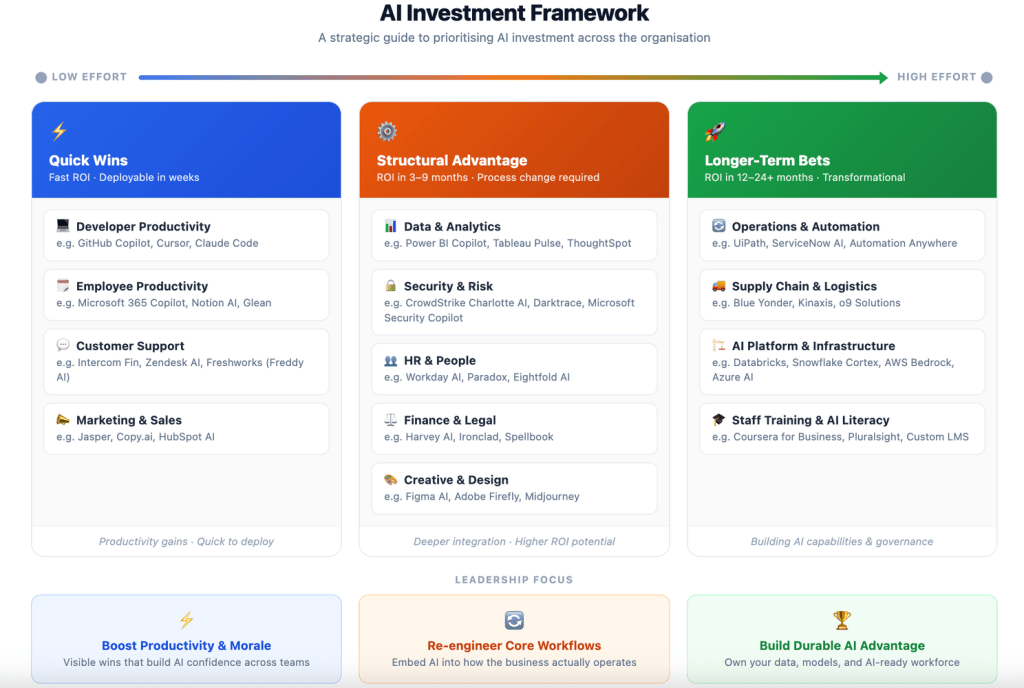
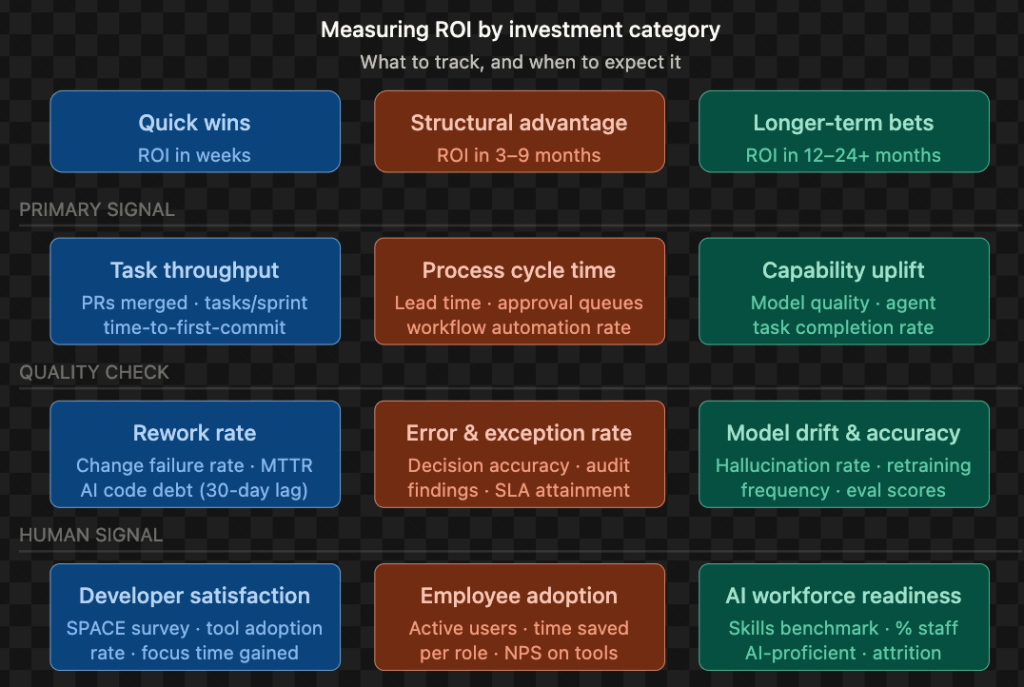
One useful way to solve this is to measure AI outcomes across three categories of investment.
Quick wins
Structural advantage
Longer-term bets
Each category produces value differently and therefore requires different signals.
Quick wins: measuring productivity gains
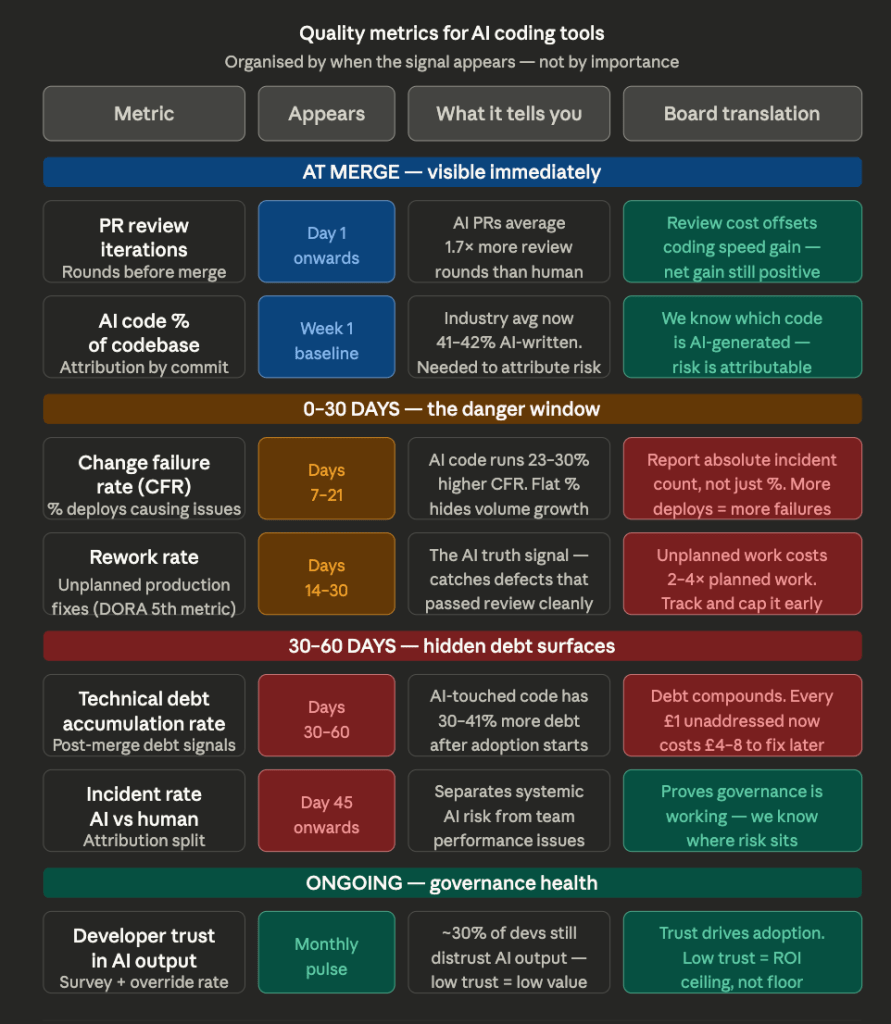
Quick Wins are the easiest to measure but the easiest to misread. Task throughput goes up immediately – but you must pair it with rework rate and a 30-day AI code debt check, or you’re just reporting velocity while quality silently degrades. The board metric here is cost-per-output: licence cost versus hours saved versus headcount not hired.
Of all the Quick Win investments, quality measurement delivers the most direct line to business outcomes. Without it, productivity gains remain anecdotal. The mindmap below outlines the criteria that turn engineering signals into board-ready evidence.
Structural advantage: measuring process transformation
Structural Advantage is trickier because the ROI is in process change, not tool adoption. If you measure a month after go-live, you’ll see noise. At 3–6 months, you should see cycle time compression, SLA improvements, and error rate reduction. The CFO metric is EBIT delta – the cost of broken decisions avoided. The watch-out is process grafting: AI layered onto a broken workflow doesn’t fix it, it accelerates the failure.
Longer-term bets: measuring strategic capability
Longer-Term Bets are the hardest to defend in a budget cycle because the value is a capability moat, not a line item. The honest board conversation is: “We won’t see financial ROI for 12–24 months, but competitors without this foundation will spend 3× more to catch up later.” The risk is the classic platform trap – infrastructure built, adoption low, governance absent.
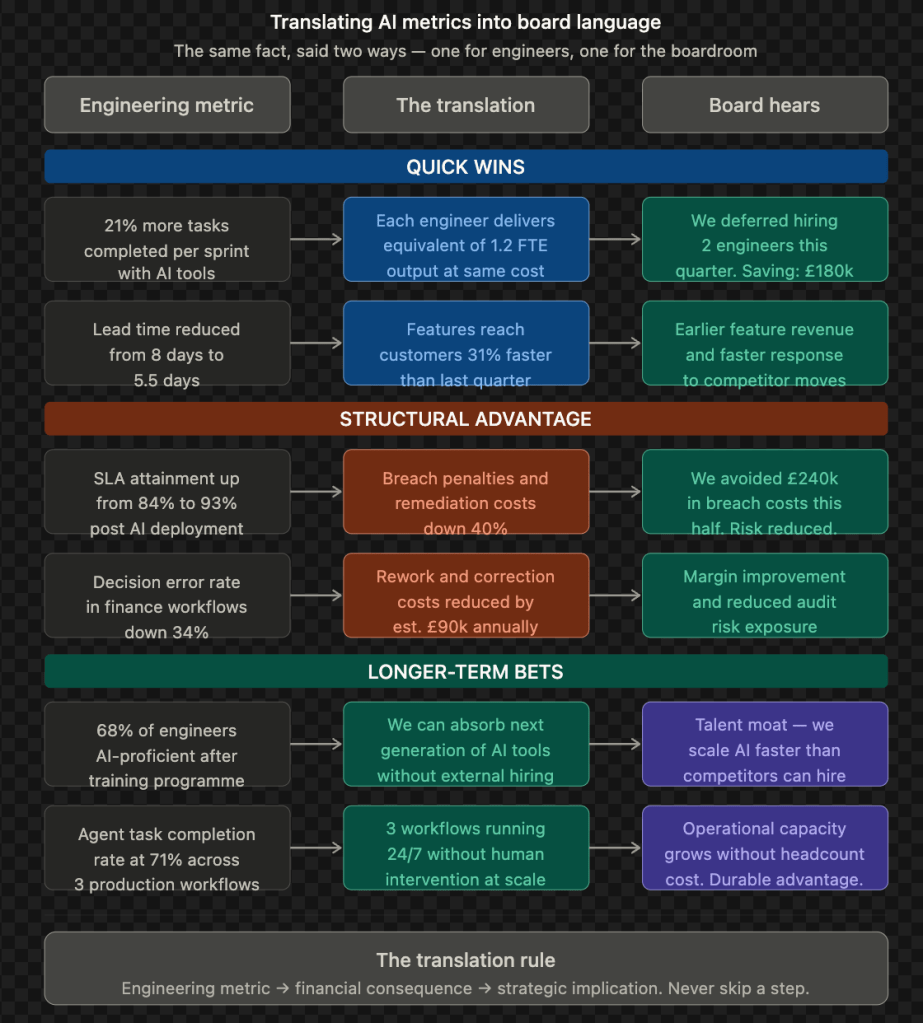
Though these are effective measurements for an Engineering Leader, the Board understands outcomes – Productivity gains, Cost optimisation, Opex & margin impacts, Competitive moat.
What leaders should watch for
Measuring AI ROI is not only about identifying signals. It also requires recognising common traps.
The first is the productivity mirage. Teams appear more productive because they produce more output, yet overall delivery remains unchanged. Hidden technical debt from AI-generated code or rushed workflows can emerge weeks later.
The second is process grafting. Organisations sometimes place AI on top of broken workflows rather than redesigning the process itself. This accelerates failure rather than improving outcomes.
The third is capability without use. Companies invest heavily in AI platforms and infrastructure but adoption remains low. The technology exists, yet the organisation has not changed how it works.
Closing thought
Boards do not measure models. They measure outcomes.
To make AI ROI visible, leaders must connect everyday workflow signals with financial impact. When productivity improvements, process efficiency, and long-term capabilities are measured together, the value of AI becomes much clearer.
And once the measurement is clear, the conversation about AI investment becomes far easier to have in the boardroom.
When AI learns to manage work, organisations must learn to manage AI.
In 2025, AI crossed a quiet but important threshold.
The technology stack stabilised.
Real-time voice works. Multi-step reasoning works. Autonomous research works.
Every major player checked the same three boxes:
Velocity: real-time interaction, especially voice
Reasoning: multi-step planning and execution
Intelligence: long-running autonomous research
And yet adoption remains uneven.
Not because the models are weak. Because organisations are.
The most expensive AI failures of late 2025 were not model failures. They were organisational failures.
The Real Friction Is Not Intelligence
Most AI demos assume a fantasy environment. Clean data. Clear ownership. Modern systems.
Reality looks different.
Integration fails silently A reasoning agent connected to a 1990s ERP is not a prompt problem. It is a plumbing problem. Most enterprises run dozens of legacy systems with unclear data contracts and partial ownership.
Economics break before intelligence does. High-reasoning models are powerful but expensive. Using a PhD-level agent to summarise a routine email is not innovation. It is architectural waste.
Voice is ready. The office is not We can run real-time voice agents. Compliance teams cannot yet audit verbal streams. Open offices were not designed for humans talking to machines all day.
And then there is the audit gap Agents can now maintain focus for 30 hours or more. The question is no longer “Can it do the work?” but “How do we audit a 30-hour autonomous workflow?”
When Assistance Quietly Turns Into Management
Something more uncomfortable is happening.
When an agent:
Breaks goals into subtasks
Prioritises its own backlog
Decides when to refactor versus ship
Authorises transactions
That is no longer assistance.
That is management behaviour.
And organisations have no org chart for AI. No decision rights. No accountability model. No answer to a simple question: who owns the outcome when an agent makes a bad call?
The result is predictable.
Agent Sprawl Is Microservices All Over Again
If you lived through 2015 to 2019, this will feel familiar.
Too many microservices. Too little orchestration. Permission sprawl. Production failures that never showed up in demos.
Agents are following the same path.
Race conditions Two agents modify the same record. No locking. It works in test, fails in production.
Permission chaos An agent inherits admin access because least privilege “took too long.” Now it can delete production data. No audit trail.
Cost explosions An agent enters deep research mode on a trivial question. No circuit breaker. Thousands in API spend before anyone notices.
Circular dependencies Agent A waits for Agent B. Agent B waits for Agent A. Both burn tokens for days.
Context drift A 10-hour workflow contradicts decisions made in hour one. No checkpoints. No reconciliation.
None of these are model problems. They are coordination failures.
What Actually Gets Built Next
In 2026, teams stop asking “Which model should we use?” They start asking “What controls our agents?”
This is where governance stops being a policy document and becomes infrastructure.
Not dashboards. Not static rules. Not prompt templates.
A real control plane exists when the system can reason about authority, intent, and boundaries at runtime.
The Capabilities That Actually Matter
There are six capabilities that separate governed autonomy from chaos.
Intent Agents must understand why they are acting, not just what task they were given.
Authority Clear decision boundaries that can adapt at runtime based on context, cost, and risk.
Identity Unique agent identities. No shared service accounts. No anonymous actors.
Coordination Rules for sequencing, conflict resolution, and deadlock handling across agents.
Decision traceability Not just logs of what happened, but why it happened.
Intervention The ability to pause, constrain, override, or terminate an agent during reasoning, not after damage is done.
Without these, you are not governing agents. You are just watching them operate.
This Is Bigger Than Infrastructure
Once you build real control, new roles appear naturally.
Agent platform owners Agent reliability teams Decision auditors Policy engineers
And new questions become unavoidable.
Who is accountable for agent outcomes?
Who approves new capabilities?
Who owns cross-agent behaviour?
How do we balance autonomy with control?
These are operating model questions, not tooling questions.
The Progression Is Clear
2023: Prompt engineering
2024: Context engineering
2025: Intent engineering
2026: Governance engineering
The competitive moat is no longer the model you license.
It is the operating model that allows you to turn autonomy on without losing control.
The Bottom Line
Autonomy without structure is a slow-motion train wreck.
The winners will not be the companies with the most agents. They will be the ones with control planes that make autonomy survivable.
In 2026, the defining question is no longer “Can AI do the work?”
As Enterprises increasingly adopt AI to capture conversations from meetings, interviews, and more, note-taking technology is evolving rapidly and unlocking huge potential. In this post, lets take a look at how AI note-taking works, its benefits, the challenges it raises, and where it is headed.
What is AI Note-Taking?
At its core, an AI note-taking app is a tool that uses artificial intelligence to capture and manage knowledge. Unlike traditional note-taking apps that act as digital notebooks, these tools go further. They can record and transcribe spoken words from meetings or conversations, then analyze the content to identify key points, action items, and decisions.
The core technologies powering these tools include:
Speech-to-Text: Converting audio into a transcript (transcribe)
Natural Language Processing (NLP): Extracting meaning and context (active listener)
Summarization: Condensing long discussions into key highlights (acting scribe)
Organization: Automatically tagging, categorizing, or linking notes (scrum master?)
Some apps even act as “AI assistants” you can query: “What decisions did we make last week?” or “What are Sarah’s action items from the client call?”
Tools on the Market
The landscape is diverse, with solutions built for different user needs. While Google and Microsoft, Zoom, Cisco WebEx have their own note taking AI integrated into the suite, there are richer tools available for easy integration
For SMBs and Teams: Affordable, user-friendly tools with strong transcription and real-time summaries like Otter.ai, Fathom, MeetGeek. They integrate with Zoom and Google Meet, making adoption simple for smaller teams.
For Large Enterprises: Enterprise-grade platforms like with advanced security (SOC 2, HIPAA), CRM integrations (Salesforce, HubSpot), and analytics on meeting dynamics. These support centralized knowledge management and conversation intelligence across departments.
The clear trend: SMBs value ease of adoption, while enterprises prioritize governance, compliance, and integration at scale.
Effectively, these tools that just started as a note takers, are evolving to identify context, pick up the necessary conversations, create and assign actions, create workflows or tracking items in TODO lists, post the summary to a channel.
Real-World Use Cases
The applications stretch far beyond office meetings:
Developer Workflows: Note-taking AI is being integrated into tools like Jira, GitHub, and Confluence, automatically logging meeting outcomes into tickets, updating project boards, or linking decisions to code commits. This turns meeting discussions into actionable developer workflows without manual effort.
Healthcare and Legal: AI scribes like Heidi Health free professionals from documentation, creating accurate, auditable records.
Global Organisations: Tools like Notta and Trint offer real-time transcription and translation, breaking language barriers in multinational forums.
Enterprise Memory: Teams use AI notes to build a searchable, living knowledge base that compounds over time.
The Downsides
AI note-taking is not without risks:
Missing Context: AI captures words but often misses tone, intent, or history.
Surveillance Risk: Notes can profile employees/participants based on engagement, tone, or frequency.
Self-Censorship: The “permanent record” effect may stifle creativity and open brainstorming.
Accuracy Limits: Jargon, accents, or noisy environments still challenge transcription.
Bias in Summaries: Quieter voices risk being minimized compared to dominant ones.
Accessibility Gaps: Limited support for diverse languages, accents, or speech differences may exclude some participants.
Privacy and Compliance: Sensitive conversations raise governance concerns (GDPR, HIPAA).
The Human Touch
Taking notes is more than transcription. It is a cognitive and social process.
Humans process and synthesize while writing, which aids memory and comprehension. They capture nuance: the tired chuckle after “we’ll finish even if it kills us,” the casual remark about a pet that warms up the room, or the subtle hesitation before a decision.
AI misses these cues. And when everything is recorded, people may hold back, losing the spontaneity that makes collaboration effective.
AI captures the what, but humans still define the so what.
Where It’s Headed
The challenges also highlight opportunities:
Contextual Awareness: Tailoring summaries based on roles, history, and ongoing projects.
Bias Mitigation: Highlighting contributions from quieter participants.
Knowledge Graphs: Linking notes into an interactive map of people, topics, and actions.
Participant Profiles: Building dynamic user context over time for more personalized outputs.
From Scribe to Analyst: Moving beyond summaries to tracking commitments, surfacing contradictions, and flagging unresolved issues.
Strategic Takeaway
AI note-taking is no longer a niche app. It is becoming part of the infrastructure of work. Every meeting is turning into data.
The winners will not be the ones who simply capture everything. They will be the ones who combine AI’s efficiency with the human layer of meaning.
Because in the end: AI gives us the notes, but humans give them meaning.
How are you using AI note-taking to streamline your work? Share your thoughts!
In this post, I explore how to build the same AI-powered chat app in Python, TypeScript, and Java using LangChain, LangChain.js, and LangChain4j. If you’re deciding how to bring AI into your stack, this guide will help you understand trade-offs and developer experience across ecosystems.
Why This Matters
AI chat applications are becoming central to digital experiences. They support customer service, internal tools, and user engagement. Whether you’re a Python data scientist, a TypeScript full-stack developer, or a Java enterprise engineer, LLMs are transforming your landscape.
Fortunately, frameworks like LangChain (Python), LangChain.js (TypeScript), and LangChain4j (Java) now make it easier to integrate LLMs without starting from scratch.
One Chat App, Three Languages
I built a basic chat app in each language using their respective LangChain implementation. The goal was to compare developer experience, language fit, and production readiness.
Python (3.12) + LangChain
from langchain_openai import ChatOpenAI

chat_model = ChatOpenAI(model="gpt-4o", temperature=0.7, api_key="YOUR_OPENAI_API_KEY")

while True:
    user_input = input("You: ")
    if user_input.lower() in ["exit", "quit"]:
        break
    response = chat_model.invoke(user_input)
    print(f"AI: {response.content}")
Takeaway Python offers the most seamless and concise development experience. It is ideal for fast prototyping and experimentation.
Takeaway TypeScript is a great fit for web-first and full-stack developers. The async structure aligns well with modern web development, and the LangChain.js ecosystem is growing rapidly.
Java (17) + LangChain4j
import dev.langchain4j.model.chat.ChatLanguageModel;
import dev.langchain4j.model.openai.OpenAiChatModel;
import java.util.Scanner;

public class BasicChatApp {
    public static void main(String[] args) {
        ChatLanguageModel model = OpenAiChatModel.builder()
            .apiKey(System.getenv("OPENAI_API_KEY"))
            .modelName("gpt-4o")
            .temperature(0.7)
            .build();

        Scanner scanner = new Scanner(System.in);
        while (true) {
            System.out.print("You: ");
            String input = scanner.nextLine();
            if (input.equalsIgnoreCase("exit") || input.equalsIgnoreCase("quit")) break;
            String response = model.chat(input);
            System.out.println("AI: " + response);
        }
    }
}
Takeaway Java with LangChain4j is designed for enterprise environments. It offers strong typing and structure, making it a solid choice for scalable, production-grade systems.
Side-by-Side Comparison
Feature
Python (LangChain)
TypeScript (LangChain.js)
Java (LangChain4j)
Ease of Setup
Easiest
Moderate
Most Complex
Best Use Case
Prototyping, research
Web apps, full-stack
Enterprise backends
Ecosystem Maturity
Most mature
Rapidly growing
Evolving
Code Verbosity
Concise
Concise with async
Verbose and structured
Strategic Insights
If you are working in a startup or a research lab, Python is the fastest way to test ideas and iterate quickly.
For web and cross-platform products, TypeScript provides excellent alignment with frontend and serverless workflows.
In regulated or large-scale enterprise systems, Java continues to be a reliable foundation. LangChain4j brings modern AI capabilities into that world.
All three ecosystems now offer viable paths to LLM integration. Choose the one that aligns with your team’s strengths and your system’s goals.
What Do You Think?
Which tech stack do you prefer for building AI applications? Have you tried LangChain or LangChain4j in your projects? I’d love to hear your thoughts or questions in the comments.
As Generative AI becomes integral to modern workflows, evaluating the quality of model outputs has become critical. Metrics like BERTScore and cosine similarity are widely used to compare generated text with reference answers. However, recent experiments in our gen-ai-tests repository show that these metrics often overestimate similarity, even when the content is unrelated or incorrect.
In this post, we will explore how these metrics work, highlight their key shortcomings, and provide real examples including test failures from GitHub Actions to show why relying on them alone is risky.
How Do These Metrics Work?
BERTScore: Uses pre-trained transformer models to compare the contextual embeddings of tokens. It calculates similarity based on token-level precision, recall, and F1 scores.
Cosine Similarity: Measures the cosine of the angle between two high-dimensional sentence embeddings. A score closer to 1 indicates greater similarity.
While these metrics are fast and easy to implement, they have critical blind spots.
Experimental Results From gen-ai-tests
We evaluated prompts and responses using prompt_eval.py.
Example 1: High Similarity for Valid Output
"prompt": "What is the capital of France?",
"expected_answer": "Paris is the capital of France.",
"generated_answer": "The capital of France is Paris."
Results:
BERTScore F1: approximately 0.93
Cosine Similarity: approximately 0.99
This is expected. Both metrics perform well when the content is semantically correct and phrased differently.
Example 2: High Similarity for Unrelated Sentences
In test_prompt_eval.py, we evaluate unrelated sentences:
def test_bertscore_unrelated():
    # Two sentences that are unrelated should have a low BERTScore
    # This is a simple example to showcase the limitations of BERTScore
    s1 = "The quick brown fox jumps over the lazy dog."
    s2 = "Quantum mechanics describes the behavior of particles at atomic scales."
    score = evaluate_bertscore(s1, s2)
    print(f"BERTScore between unrelated sentences: {score}")
    assert score < 0.8


def test_cosine_similarity_unrelated():
    s1 = "The quick brown fox jumps over the lazy dog."
    s2 = "Quantum mechanics describes the behavior of particles at atomic scales."
    sim = evaluate_cosine_similarity(s1, s2)
    print(f"Cosine similarity between unrelated sentences: {sim}")
    assert sim < 0.8
However, this test fails. Despite the sentences being completely unrelated, BERTScore returns a score above 0.8.
Real Test Failure in CI
Here is the actual test failure from our GitHub Actions pipeline:
This demonstrates how BERTScore can be misleading even in automated test pipelines, letting incorrect or irrelevant GenAI outputs pass evaluation.
Key Limitations Observed
Overestimation of Similarity Common linguistic patterns and phrasing can inflate similarity scores, even when the content is semantically different.
No Factual Awareness These metrics do not measure whether the generated output is correct or grounded in fact. They only compare vector embeddings.
Insensitive to Word Order or Meaning Shift Sentences like “The cat chased the dog” and “The dog chased the cat” may receive similarly high scores, despite the reversed meaning.
What to Use Instead?
To evaluate GenAI reliably, especially in production, we recommend integrating context-aware, task-specific, or model-in-the-loop evaluation strategies:
LLM-as-a-judge using GPT-4 or Claude for qualitative feedback.
BLEURT, G-Eval, or BARTScore for learned scoring aligned with human judgments.
Fact-checking modules, citation checkers, or hallucination detectors.
Hybrid pipelines that combine automatic similarity scoring with targeted LLM evaluation and manual review.
Final Takeaway
If you are evaluating GenAI outputs for tasks like question answering, summarization, or decision support, do not rely solely on BERTScore or cosine similarity. These metrics can lead to overconfident assessments of poor-quality outputs.
You can find all code and examples here: 📁 gen-ai-tests 📄 prompt_eval.py, test_prompt_eval.py
The rapid advancement of AI agents, particularly in software development, is paving the way for a transformative ecosystem where businesses can rent or hire specialised AI agents tailored to specific coding tasks. This article explores a future where one or more companies provide a marketplace of AI agents with varying capabilities – such as front-end development, security analysis, or backend optimisation – powered by Small Language Models (SLMs) or Large Language Models (LLMs). The pricing of these agents is tiered based on their computational backing and expertise, creating a dynamic and accessible solution for companies of all sizes.
The Agent Rental Ecosystem
Concept Overview
Imagine a platform operated by an AI agent provider company, functioning as a marketplace for renting AI coding agents. These agents are pre-trained for specialised roles, such as:
Front-End Specialist: Designs and implements user interfaces using frameworks like React or Vue.js, ensuring responsive and accessible designs.
Security Specialist: Performs vulnerability assessments, penetration testing, and secure code reviews to safeguard applications.
Backend Specialist: Optimizes server-side logic, database management, and API development using technologies like Node.js or Django.
DevOps Specialist: Automates CI/CD pipelines, manages cloud infrastructure, and ensures scalability with tools like Docker and Kubernetes.
Full-Stack Generalist: Handles end-to-end development for smaller projects requiring versatility.
Each agent is backed by either an SLM for lightweight, cost-effective tasks or an LLM for complex, context-heavy projects. The provider company maintains a robust infrastructure to deploy these agents on-demand, integrating seamlessly with clients’ development environments.
Technical Architecture
The ecosystem operates on a cloud-based platform with the following components:
Agent Catalog: A user-friendly interface where clients browse agents by role, expertise, and model type (SLM or LLM).
Model Management: A backend system that dynamically allocates SLMs or LLMs based on task requirements, optimizing for cost and performance.
Integration Layer: APIs and SDKs that allow agents to plug into existing IDEs, version control systems (e.g., Git), and cloud platforms (e.g., AWS, Azure).
Monitoring and Feedback: Real-time dashboards to track agent performance, code quality, and task completion, with feedback loops to improve agent training.
Billing System: A usage-based pricing model that charges clients based on agent runtime, model type, and task complexity.
Pricing Model
The cost of renting an AI agent is determined by:
Model Type: SLM-backed agents are cheaper, suitable for routine tasks like UI component design or basic debugging. LLM-backed agents, with their superior reasoning and context awareness, are priced higher for tasks like architectural design or advanced security audits.
Task Duration: Short-term tasks (e.g., a one-hour code review) are billed hourly, while long-term projects (e.g., building an entire application) offer subscription-based discounts.
Specialization Level: Highly specialized agents, such as those trained for niche domains like blockchain or IoT security, command premium rates.
Resource Usage: Computational resources (e.g., GPU usage for LLMs) and data storage needs influence the final cost.
For example:
A front-end SLM agent for designing a landing page might cost $10/hour.
A security-specialist LLM agent for a comprehensive penetration test could cost $100/hour.
Benefits of the Ecosystem
Accessibility: Small startups and individual developers can access high-quality AI expertise without hiring full-time specialists.
Scalability: Enterprises can scale development teams instantly by renting multiple agents for parallel tasks.
Cost Efficiency: Clients pay only for the specific skills and duration needed, avoiding the overhead of traditional hiring.
Quality Assurance: The provider company ensures agents are trained on the latest frameworks, standards, and best practices.
Flexibility: Clients can mix and match agents (e.g., a front-end SLM agent with a backend LLM agent) to suit project needs.
Challenges and Considerations
Ethical Concerns: Ensuring agents do not produce biased or insecure code, requiring rigorous auditing and transparency.
Integration Complexity: Seamlessly embedding agents into diverse development environments may require significant upfront configuration.
Skill Gaps: SLM-backed agents may struggle with highly creative or ambiguous tasks, necessitating LLM intervention.
Data Privacy: Safeguarding client code and proprietary data processed by agents is critical, demanding robust encryption and compliance with regulations like GDPR.
Market Competition: The provider must differentiate itself in a crowded AI market by offering superior agent performance and customer support.
Future Outlook
As AI models become more efficient and specialized, the agent rental ecosystem could expand beyond coding to domains like design, marketing, or legal analysis. The provider company could introduce features like:
Agent Customization: Allowing clients to fine-tune agents with proprietary data or specific workflows.
Collaborative Agents: Enabling teams of agents to work together on complex projects, mimicking human development teams.
Global Accessibility: Offering multilingual agents to cater to diverse markets, powered by localized SLMs or LLMs.
Conclusion
The ecosystem of renting AI coding agents represents a paradigm shift in software development, democratising access to specialised expertise while optimising costs. By offering a range of SLM- and LLM-backed agents, the provider company can cater to diverse needs, from startups building MVPs to enterprises securing mission-critical systems. While challenges like data privacy and integration remain, the potential for innovation and efficiency makes this a compelling vision for the future of work.
Generative AI agents are transforming how we interact with technology, offering powerful tools for creativity, productivity, and research. Let us explore the free tier offerings of four leading AI agents – ChatGPT, Google Gemini, Grok, and Claude – highlighting their core features and recent updates available to users without a paid subscription.
ChatGPT (OpenAI)
What It Offers: ChatGPT, powered by the GPT-4o model, is a versatile conversational AI accessible for free with a registered account. It excels in tasks like casual conversation, creative writing, coding assistance, and answering complex questions. Its clean interface and conversational memory (when enabled) allow for personalized, context-aware interactions, making it ideal for writers, students, and casual users. The free tier supports text generation, basic reasoning, and limited image description capabilities.
Recent Updates: As of April 2025, free users can access GPT-4o, which offers improved speed and reasoning compared to GPT-3.5. However, usage is capped at approximately 15 messages every three hours, reverting to GPT-3.5 during peak times or after limits are reached. OpenAI has also introduced limited access to “Operators,” AI agents that can perform tasks like booking or shopping, though these are more restricted in the free tier.
Why It Stands Out: ChatGPT’s user-friendly design and broad task versatility make it a go-to for general-purpose AI needs, with a proven track record of refinement based on millions of users’ feedback.
Google Gemini
What It Offers: Gemini, Google’s multimodal AI, is deeply integrated with Google’s ecosystem (Search, Gmail, Docs) and shines in real-time web access, research, and creative tasks. The free tier, capped at around 500 interactions per month, supports text generation, image analysis, and basic image generation via Imagen 3. Gemini’s ability to provide multiple response drafts and its conversational tone make it great for brainstorming and research.
Recent Updates: In March 2025, Google made Gemini 2.5 Pro experimental available to free users, boosting performance in reasoning and coding tasks. The Deep Research feature, offering comprehensive, citation-rich reports, is now free with a limit of 10 queries per month. Additionally, free users can create limited “Gems” (custom AI personas) for tasks like fitness coaching or resume editing, enhancing personalisation.
Why It Stands Out: Gemini’s seamless Google integration and free access to advanced features like Deep Research give it an edge for users already in the Google ecosystem or those needing robust research tools.
Grok (xAI)
What It Offers: Grok, developed by xAI, is designed for witty, less-filtered conversations and integrates with the X platform for real-time insights. The free tier, available temporarily as of February 2025, supports text generation, image analysis, and basic image generation. Grok’s “workspaces” feature allows users to organize thoughts, share related material, and collaborate, making it ideal for dynamic, social-media-driven workflows.
Recent Updates: Launched on February 18, 2025, Grok 3 has shown strong performance in benchmarks, excelling in reasoning, coding, and creative writing. The recent introduction of Grok Studio (April 2025) enables free users to generate websites, papers, and games with real-time editing, similar to OpenAI’s Canvas. Integration with Google Drive further enhances its utility for collaborative projects.
Why It Stands Out: Grok’s workspaces and Studio features offer a unique, interactive approach to organising and creating content, appealing to users who value humour and real-time social context.
Claude (Anthropic)
What It Offers: Claude, powered by Claude 3.5 Sonnet, is a text-focused AI emphasizing ethical responses and strong contextual understanding. The free tier supports basic text generation, long-document processing (up to 100K tokens), and image analysis (up to 5 images per prompt). Its “Projects” space, similar to Grok’s workspaces, allows users to organize documents and prompts for focused tasks, making it suitable for researchers and writers.
Recent Updates: In late 2024, Claude added vision capabilities to its free tier, enabling image analysis for tasks like chart interpretation or text extraction. The Projects feature has been enhanced to support better document management, offering a structured environment for summarising or comparing large texts.
Why It Stands Out: Claude’s ability to handle lengthy documents and its Projects space make it a top choice for users needing deep text analysis or organized workflows, with a focus on safe, moderated responses.
Below is a tabular comparison
Criteria
ChatGPT (OpenAI)
Gemini (Google)
Grok (xAI)
Claude (Anthropic)
Natural Language
Conversational, creative, great for writing & Q&A
Advanced research & brainstorming, nuanced drafts
Witty, creative dialogue, less filtered
Ethical, contextual, excels in text analysis
Languages
~100 (English, Spanish, Mandarin, etc.).
150+ with Google Translate.
~50, English-focused, expanding.
~30, mainly English.
Tone & Personality
Friendly, neutral, adaptable.
Approachable, customizable via Gems.
Humorous, edgy, JARVIS-like.
Safe, formal, ethical.
Real-Time Info
Limited, no web access.
Strong, Google Search integration.
Strong, X platform news & social.
None, internal knowledge only.
Chat Organization
Basic history with search.
Google account, no workspaces.
Workspaces for collaboration.
Projects for structured docs.
Context Window
~128K tokens.
~1M tokens.
~128K tokens.
~200K tokens.
Deep Search/Think
Deep Research
Deep Research (10/mo).
Think mode via UI.
None in free tier.
Coding Support
Strong (Python, JS, debugging).
Excellent (multi-language).
Strong (Grok Studio for websites/games).
Moderate, basic coding.
Custom Models
Limited GPTs (e.g., tutor).
Gems (1-2, e.g., chef).
None, default personality.
None, Project-based workflows.
Daily Limits
~15 msgs/3hr (GPT-4o), then GPT-3.5.
~500/mo, throttled at peak.
Temporarily unlimited (Feb 2025).
~50 msgs/day, varies.
Top Model
GPT-4o (text, image).
Gemini 2.5 Pro (text, image).
Grok 3 (text, image).
Claude 3.7 Sonnet (text, image).
Response Speed
Fast (1-2s), slows at peak.
Very fast (0.5-1s).
Fast (1-2s), varies with X.
Moderate (2-3s), some delays.
Recent Highlights
Lookout app, Operators for tasks.
Imagen 3, Spotify extension.
Grok Studio, Google Drive.
Vision for images, enhanced Projects.
Daily active users
122.5M
35M
16.5M
3.3M
Key Takeaways
ChatGPT: Versatile, great for general tasks, limited by message caps.
Gemini: Research powerhouse with Google integration.
Grok: Creative, social-media-driven with workspaces.
Claude: Ethical, text-heavy tasks with Projects.
Which AI fits your workflow? Share your thoughts! #AI #Tech #GenAI