Over the past two years most organisations moved from asking one question about AI:
“Should we experiment with it?”
to a much harder one:
“What value are we actually getting from it?”
Boards are no longer impressed by prototypes, copilots, or internal demos. AI investment is now being evaluated the same way as any other strategic initiative. Executives want measurable impact. They want to understand whether these investments improve productivity, reduce costs, or create competitive advantage.
The difficulty is that AI value rarely appears in a single obvious metric.
Instead it shows up as small improvements distributed across many workflows
- A developer completes a task faster
- A support agent answers queries more quickly
- A finance team processes documents with less manual effort.
Individually these gains seem modest. Across the organisation they compound into meaningful operational change. This is why many companies struggle to demonstrate AI ROI to leadership. The signals exist, but they are scattered.
One useful way to solve this is to measure AI outcomes across three categories of investment.
- Quick wins
- Structural advantage
- Longer-term bets
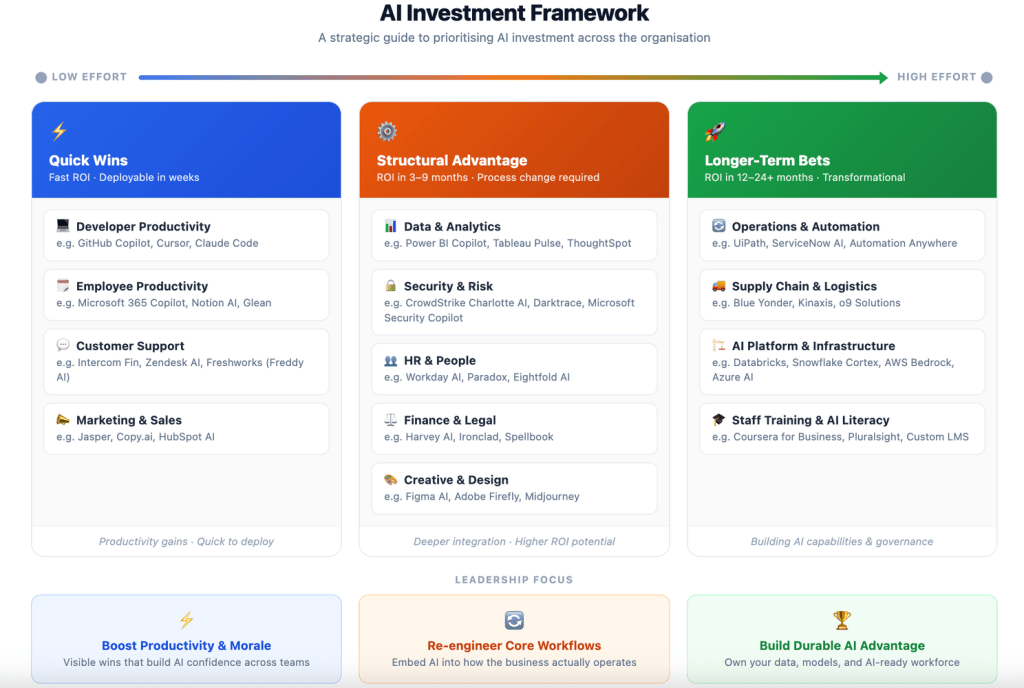
Each category produces value differently and therefore requires different signals.
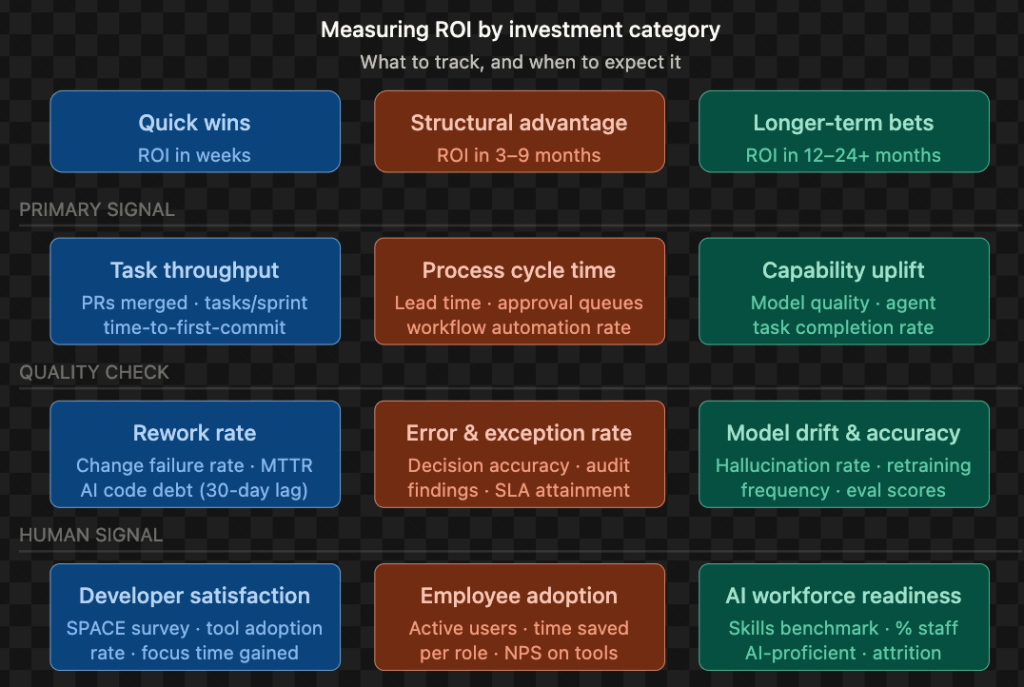
Quick wins: measuring productivity gains
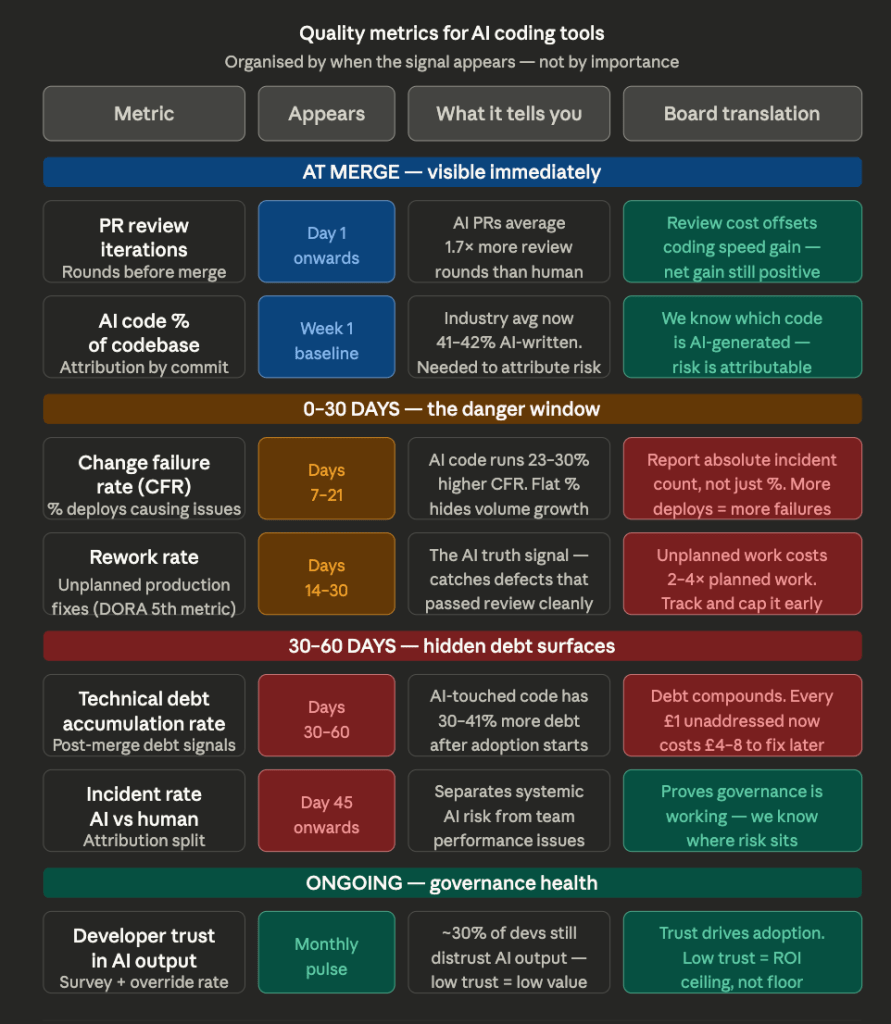
Quick Wins are the easiest to measure but the easiest to misread. Task throughput goes up immediately – but you must pair it with rework rate and a 30-day AI code debt check, or you’re just reporting velocity while quality silently degrades. The board metric here is cost-per-output: licence cost versus hours saved versus headcount not hired.
Of all the Quick Win investments, quality measurement delivers the most direct line to business outcomes. Without it, productivity gains remain anecdotal. The mindmap below outlines the criteria that turn engineering signals into board-ready evidence.
Structural advantage: measuring process transformation
Structural Advantage is trickier because the ROI is in process change, not tool adoption. If you measure a month after go-live, you’ll see noise. At 3–6 months, you should see cycle time compression, SLA improvements, and error rate reduction. The CFO metric is EBIT delta – the cost of broken decisions avoided. The watch-out is process grafting: AI layered onto a broken workflow doesn’t fix it, it accelerates the failure.
Longer-term bets: measuring strategic capability
Longer-Term Bets are the hardest to defend in a budget cycle because the value is a capability moat, not a line item. The honest board conversation is: “We won’t see financial ROI for 12–24 months, but competitors without this foundation will spend 3× more to catch up later.” The risk is the classic platform trap – infrastructure built, adoption low, governance absent.
Though these are effective measurements for an Engineering Leader, the Board understands outcomes – Productivity gains, Cost optimisation, Opex & margin impacts, Competitive moat.
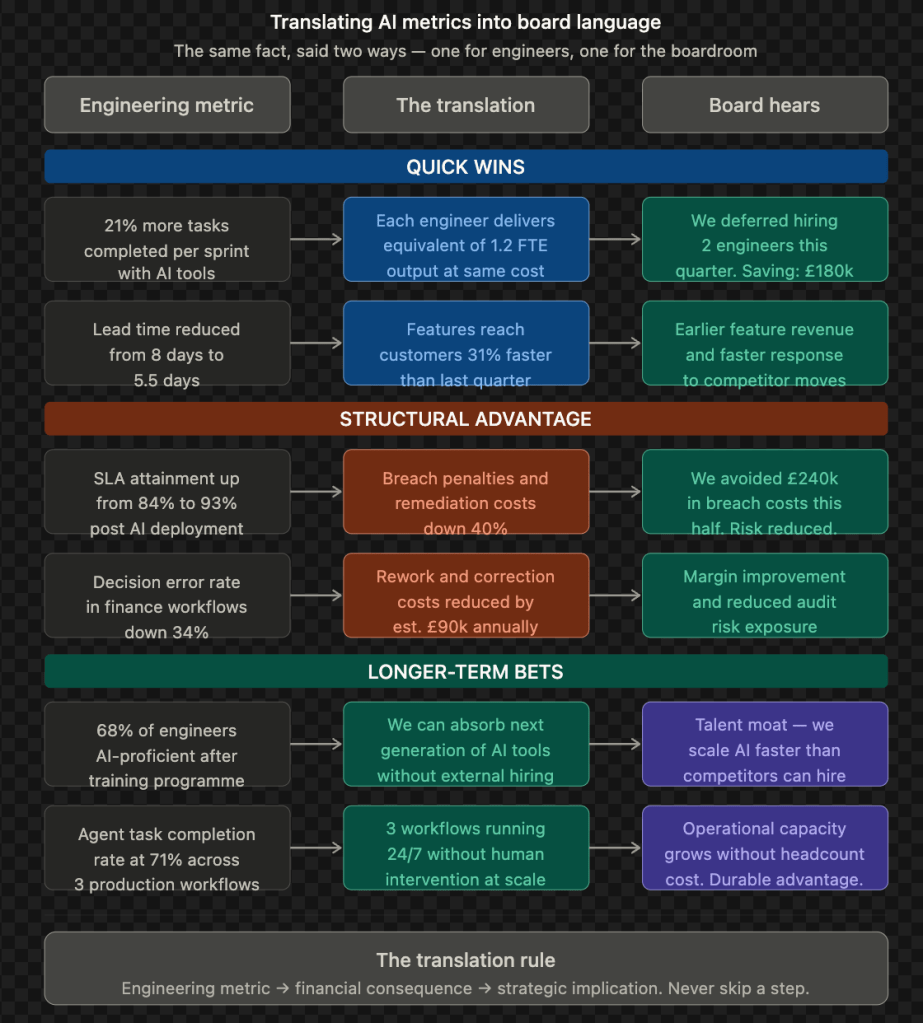
What leaders should watch for
Measuring AI ROI is not only about identifying signals. It also requires recognising common traps.
The first is the productivity mirage. Teams appear more productive because they produce more output, yet overall delivery remains unchanged. Hidden technical debt from AI-generated code or rushed workflows can emerge weeks later.
The second is process grafting. Organisations sometimes place AI on top of broken workflows rather than redesigning the process itself. This accelerates failure rather than improving outcomes.
The third is capability without use. Companies invest heavily in AI platforms and infrastructure but adoption remains low. The technology exists, yet the organisation has not changed how it works.
Closing thought
Boards do not measure models. They measure outcomes.
To make AI ROI visible, leaders must connect everyday workflow signals with financial impact. When productivity improvements, process efficiency, and long-term capabilities are measured together, the value of AI becomes much clearer.
And once the measurement is clear, the conversation about AI investment becomes far easier to have in the boardroom.

 D Curious Tech